

Change Hamburger Mobile Menu Icon Color in Divi
In this blog, i will share how to change hamburger mobile menu icon color in the Divi theme.
In tablets and mobiles the divi theme shows a drop down menu. The drop down menu has a hamburger icon like three straight lines.
To clarify it more will change the color of the hamburger icon of the picture given below

Specifically Option is not given to change the color of the hamburger icon. Therefore color of the hamburger icon can change with a simple bit of piece of code.
The color of the hamburger icon is linked to text color of the menu items. You can change the color of the text color Customizer > Mobile Styles > Mobile Menu > Text Color.
CSS code to change hamburger menu icon color
Go to WordPress Dashboard > Divi > Theme Options > Custom CSS and place the piece of code in custom CSS box.
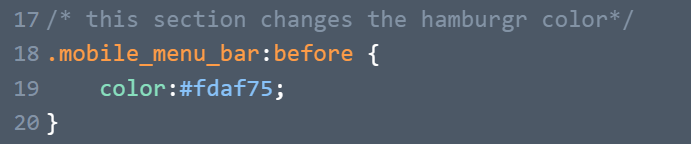
You can change the color as per your likes. Check the below picture to have better understanding:
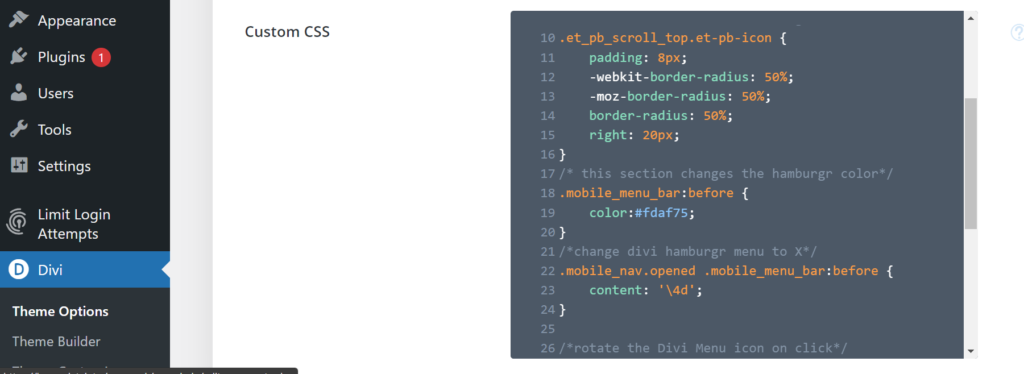
Or
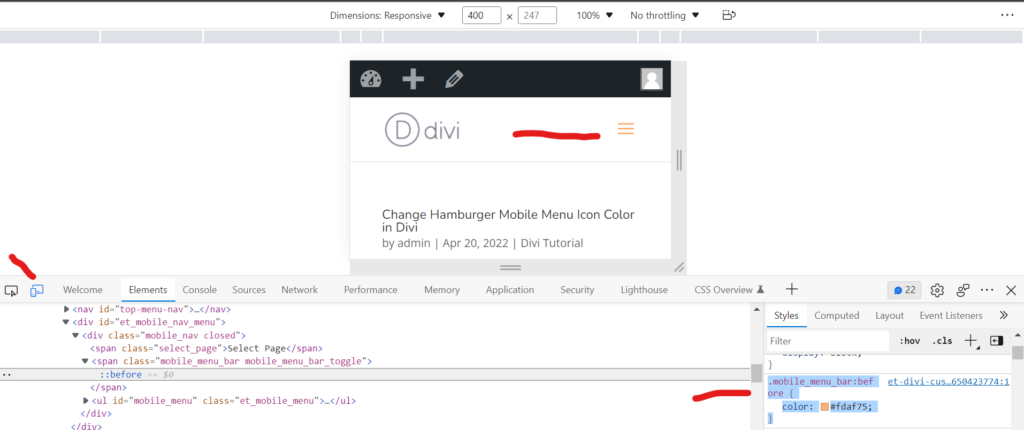
For easily access the code Press ctrl+Shift +s to inspect the code Or right click on the mouse and inpect the code. click on the little mobile icon then click on the little arrow beside the mobile icon. Then click on the three straight lines and get the code from the style secetion , and paste it in the custom Css.
Picture is given below:
That’s it!
Just want to clarify this code will not work for the menu module. This code will only work for the default Divi theme header.
If you are using the menu module then you should change the color of the icon in the module settings. There are a lot more controls in the menu module to style it compared to the default header.
In case of any question comment below. Don’t forget to subscribe the Newsletter to receive the latest articles in your Inbox.